심각도 코드 설명 프로젝트 파일 줄 비표시 오류(Suppression) 상태
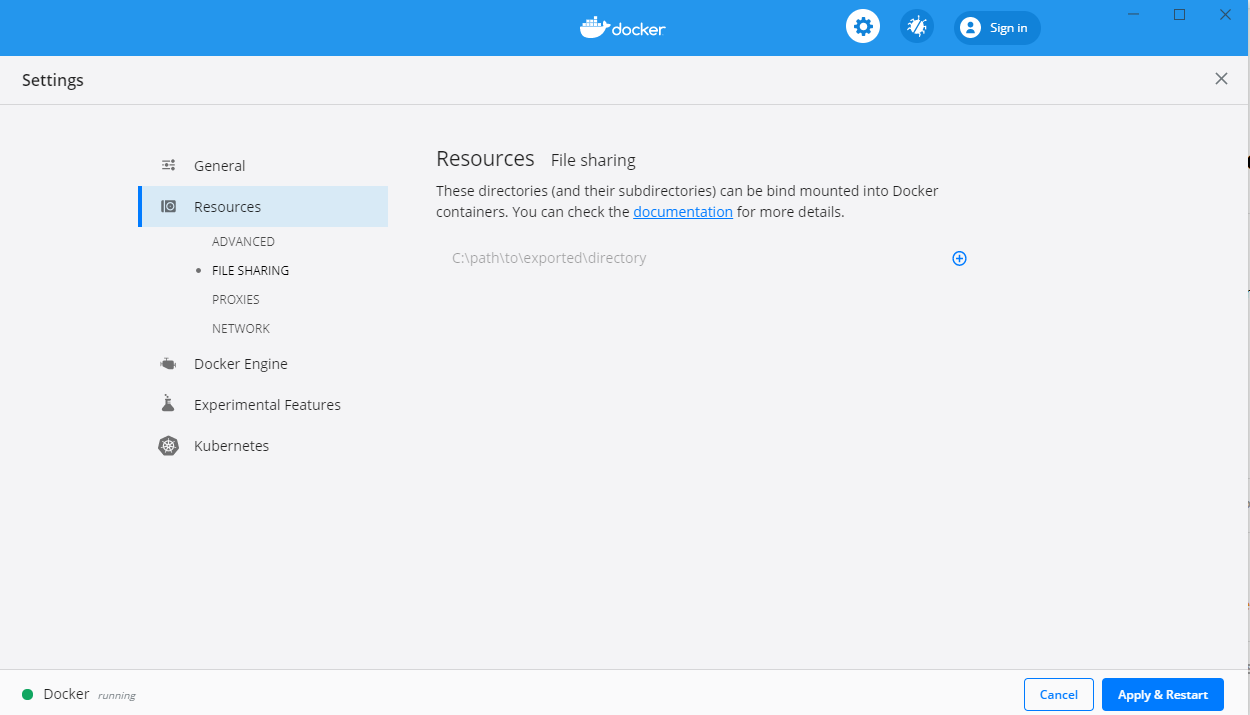
오류 CTC1001 Volume sharing is not enabled. On the Settings screen in Docker Desktop, click Resources -> Shared Drives, and select the drive(s) or folder(s) containing your project files. For more information, please visit - https://aka.ms/DockerToolsTroubleshooting migration.labs.hunet.co.kr C:\Users\m78mjg.HUNET-IN\.nuget\packages\microsoft.visualstudio.azure.containers.tools.targets\1.10.13\build\Container.targets 209
Volume sharing is not enabled. Enable volume sharing in the Docker CE for Windows settings (Linux containers only)
File sharing only needs to be managed if you are using Hyper-V with Docker. If you are using WSL 2, the following steps are not necessary and the file sharing option will not be visible. To resolve this issue:
- Right-click Docker for Windows in the notification area, and then select Settings.
- Select Resources > File Sharing and share the folder that needs to be accessed. Sharing your entire system drive is possible but not recommended.